🐳 Docker & ☸️ Kubernetes
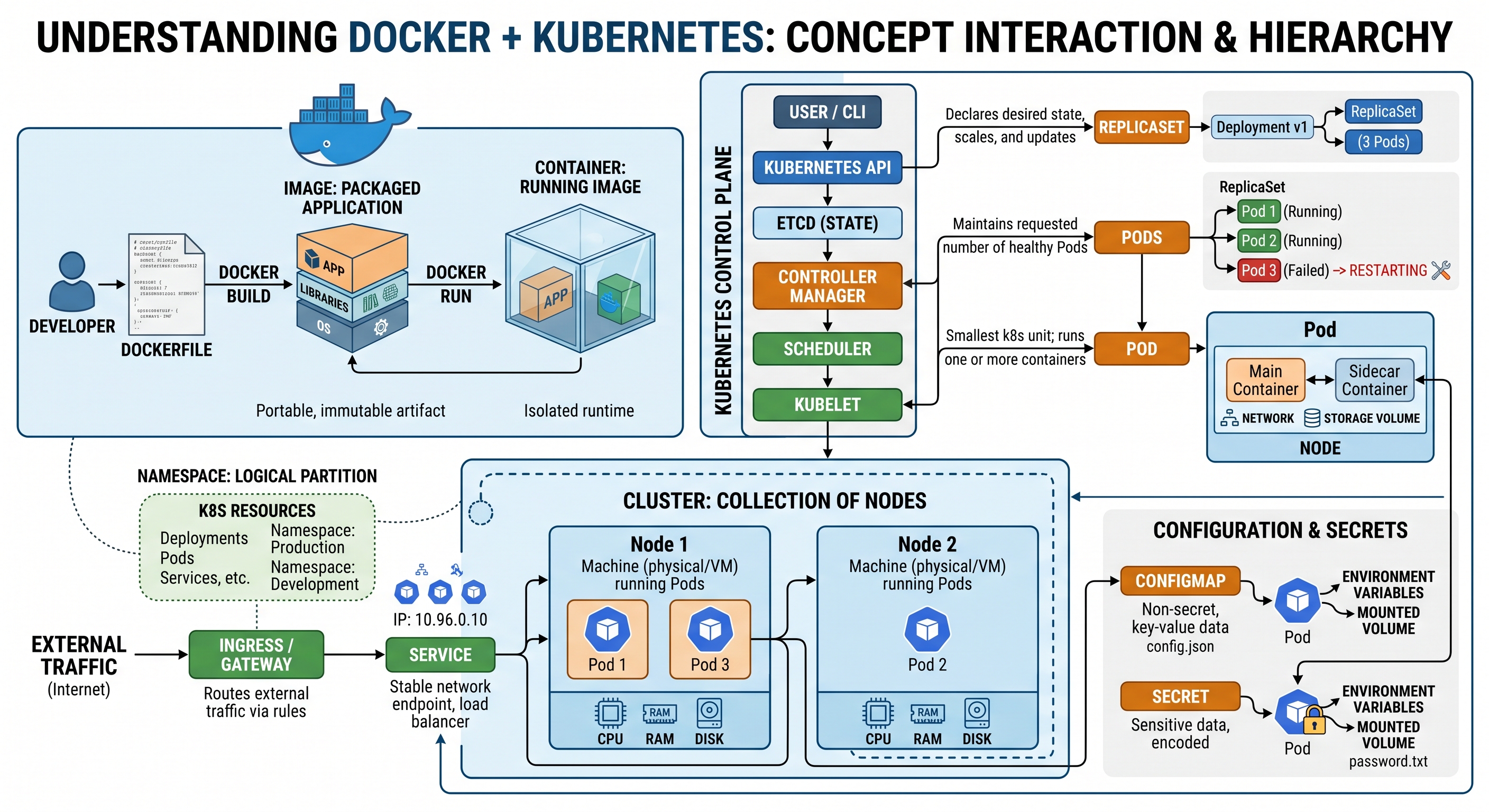
← Back to CheatsheetsDocker packages applications into portable containers — isolated environments that run the same everywhere. Kubernetes orchestrates those containers at scale, handling scheduling, scaling, self-healing, and networking across a cluster of machines.
Images
▼
Images are immutable snapshots built from a Dockerfile. Each RUN, COPY, and ADD instruction creates a new layer — layers are cached, so order matters for build speed.
docker pull nginx:alpine
docker push myuser/myimage:1.0docker build -t myimage:latest .
docker build -t myimage:latest -f Dockerfile.prod .docker tag myimage:latest myuser/myimage:1.0docker images
docker rmi myimage:latestFROM node:20-alpine
WORKDIR /app
COPY package*.json ./
RUN npm ci --only=production
COPY . .
EXPOSE 3000
CMD ["node", "server.js"]
Containers
▼
Containers are running instances of an image. They are ephemeral by default — any filesystem changes are lost when the container is removed. Use volumes to persist data.
docker run -d -p 8080:80 --name web nginx
docker run -it --rm ubuntu bash        # interactive, auto-remove on exit
docker run -e ENV_VAR=value myimage # set environment variabledocker ps
docker ps -a # includes stopped containersdocker start web
docker stop web
docker restart webdocker exec -it web bash
docker exec web ls /appdocker logs web
docker logs -f web # follow live
docker logs --tail 100 web # last 100 linesdocker cp ./local.txt web:/app/local.txt
docker cp web:/app/output.txt ./output.txtdocker inspect web
Volumes
▼
Volumes persist data outside the container lifecycle. Named volumes are managed by Docker; bind mounts map a host path directly into the container.
docker volume create mydata
docker run -v mydata:/app/data myimage
docker volume ls
docker volume rm mydatadocker run -v /host/path:/container/path myimage
docker run -v $(pwd):/app myimage # mount current dir
Networking
▼
Containers on the same network can communicate by container name. The default bridge network doesn't support DNS; create a custom network instead.
docker network create mynet
docker run --network mynet --name db postgres
docker run --network mynet --name app myimage # can reach "db" by namedocker network ls
docker network inspect mynet
docker network rm mynet
Docker Compose
▼
Compose defines multi-container applications in a docker-compose.yml file. It handles networking, volumes, and startup order automatically.
docker compose up -d         # start in background
docker compose down          # stop and remove containers
docker compose down -v       # also remove volumes
docker compose build         # rebuild images
docker compose ps            # list services
docker compose logs -f       # follow all service logs
docker compose exec app bash # shell into a serviceservices:
db:
image: postgres:16-alpine
environment:
POSTGRES_PASSWORD: secret
volumes:
- pgdata:/var/lib/postgresql/data
app:
build: .
ports:
- "3000:3000"
environment:
DATABASE_URL: postgres://postgres:secret@db/mydb
depends_on:
- db
volumes:
pgdata:
Cleanup
▼
Docker accumulates stopped containers, dangling images, and unused volumes over time. Use prune commands to reclaim disk space.
docker container prune   # remove stopped containers
docker image prune       # remove dangling (untagged) images
docker volume prune      # remove unused volumes
docker network prune # remove unused networksdocker system prune -a --volumesdocker system df
Architecture
▼
A Kubernetes cluster has a control plane (API Server, scheduler, etcd, controller-manager) and one or more worker nodes. Each node runs a kubelet agent and a container runtime. Workloads are scheduled as Pods — the smallest deployable unit, containing one or more containers.
kube-apiserver— front door for all API callsetcd— cluster state store (key-value)kube-scheduler— assigns pods to nodeskube-controller-manager— reconciliation loops
kubelet— ensures containers in pods are runningkube-proxy— network rules for Service routingcontainer runtime— containerd / CRI-O
kubectl
▼
The Kubernetes CLI. All commands talk to the API server via your ~/.kube/config file. Most commands accept -n <namespace> or -A (all namespaces).
kubectl get pods
kubectl get pods -n mynamespace
kubectl get pods -A                  # all namespaces
kubectl get deployments,services
kubectl get all                      # pods, deploys, svcs, etc.
kubectl get pod mypod -o wide        # extra columns (node, IP)
kubectl get pod mypod -o yaml # full manifestkubectl describe pod mypod
kubectl describe node mynode
kubectl logs mypod
kubectl logs -f mypod # follow
kubectl logs mypod -c mycontainer # specific container
kubectl events --for pod/mypodkubectl apply -f manifest.yaml
kubectl apply -f ./k8s/ # apply a whole directory
kubectl delete -f manifest.yaml
kubectl delete pod mypod
kubectl delete pod mypod --grace-period=0 # forcekubectl exec -it mypod -- bash
kubectl exec -it mypod -c mycontainer -- sh
kubectl port-forward pod/mypod 8080:80
kubectl port-forward svc/myservice 8080:80kubectl config get-contexts # list all contexts
kubectl config use-context mycontext # switch cluster
kubectl config current-context
kubectl config set-context --current --namespace=mynamespace # set default ns
Workloads — Pods & Deployments
▼
A Pod is one or more containers sharing network and storage. A Deployment manages a ReplicaSet to ensure the desired number of pod replicas are running. Never create bare Pods in production — use a Deployment so pods are rescheduled if a node fails.
apiVersion: v1
kind: Pod
metadata:
  name: nginx
  labels:
    app: nginx
spec:
  containers:
  - name: nginx
    image: nginx:alpine
    ports:
    - containerPort: 80
    resources:
      requests:
        memory: "64Mi"
        cpu: "100m"
      limits:
        memory: "128Mi"
cpu: "250m"apiVersion: apps/v1
kind: Deployment
metadata:
name: myapp
spec:
replicas: 3
selector:
matchLabels:
app: myapp
template:
metadata:
labels:
app: myapp
spec:
containers:
- name: myapp
image: myimage:1.0
ports:
- containerPort: 3000
env:
- name: ENV_VAR
value: "value"kubectl scale deployment myapp --replicas=5
kubectl set image deployment/myapp myapp=myimage:2.0 # rolling update
kubectl rollout status deployment/myapp
kubectl rollout history deployment/myapp
kubectl rollout undo deployment/myapp # revert to previous
kubectl rollout undo deployment/myapp --to-revision=2
Services & Networking
▼
A Service gives pods a stable DNS name and IP, load-balancing traffic across matching pods via label selectors. Pod IPs change on reschedule — always access pods through a Service.
ClusterIPInternal only — default. Reachable within the cluster assvcname.namespace.svc.cluster.local.NodePortExposes on each node's IP at a static port (30000–32767). OK for dev; not production.LoadBalancerProvisions a cloud load balancer (AWS ELB, GCP LB, etc.). Production-grade external access.
apiVersion: v1
kind: Service
metadata:
  name: myapp-svc
spec:
  selector:
    app: myapp          # matches pod labels
  ports:
  - port: 80            # service port
    targetPort: 3000    # container port
type: ClusterIP # or NodePort / LoadBalancerapiVersion: networking.k8s.io/v1
kind: Ingress
metadata:
name: myapp-ingress
annotations:
nginx.ingress.kubernetes.io/rewrite-target: /
spec:
rules:
- host: myapp.example.com
http:
paths:
- path: /
pathType: Prefix
backend:
service:
name: myapp-svc
port:
number: 80
ConfigMaps & Secrets
▼
ConfigMaps store non-sensitive config as key-value pairs. Secrets store sensitive data (base64-encoded by default — use encryption at rest in production). Both can be injected as environment variables or mounted as files.
# ConfigMap
kubectl create configmap myconfig \
  --from-literal=LOG_LEVEL=info \
  --from-file=config.properties

# Secret
kubectl create secret generic mysecret \
  --from-literal=DB_PASSWORD=s3cr3t \
--from-literal=API_KEY=abc123spec:
containers:
- name: myapp
image: myimage:1.0
env:
- name: LOG_LEVEL
valueFrom:
configMapKeyRef:
name: myconfig
key: LOG_LEVEL
- name: DB_PASSWORD
valueFrom:
secretKeyRef:
name: mysecret
key: DB_PASSWORD
envFrom:
- configMapRef:
name: myconfig # inject all keys at oncespec:
volumes:
- name: config-vol
configMap:
name: myconfig
containers:
- name: myapp
volumeMounts:
- name: config-vol
mountPath: /etc/config # each key becomes a file
Namespaces
▼
Namespaces provide logical isolation within a cluster — separate environments (dev/staging/prod), teams, or applications. Resources in different namespaces can still communicate via fully-qualified DNS: svcname.namespace.svc.cluster.local.
kubectl get namespaces
kubectl create namespace staging
kubectl delete namespace staging

# Run everything in a namespace
kubectl -n staging get pods
kubectl -n staging apply -f deploy.yaml

# Set your default namespace for the session
kubectl config set-context --current \
--namespace=stagingapiVersion: v1
kind: Namespace
metadata:
name: staging
---
apiVersion: v1
kind: ResourceQuota
metadata:
name: staging-quota
namespace: staging
spec:
hard:
pods: "20"
requests.cpu: "4"
requests.memory: 4Gi
limits.cpu: "8"
limits.memory: 8GidefaultWhere resources land if no namespace is specified
kube-systemControl plane components, DNS, networking add-ons
kube-publicPublicly readable; rarely used directly
kube-node-leaseNode heartbeat lease objects